 AI Tips
Key Takeaway / Executive Summary
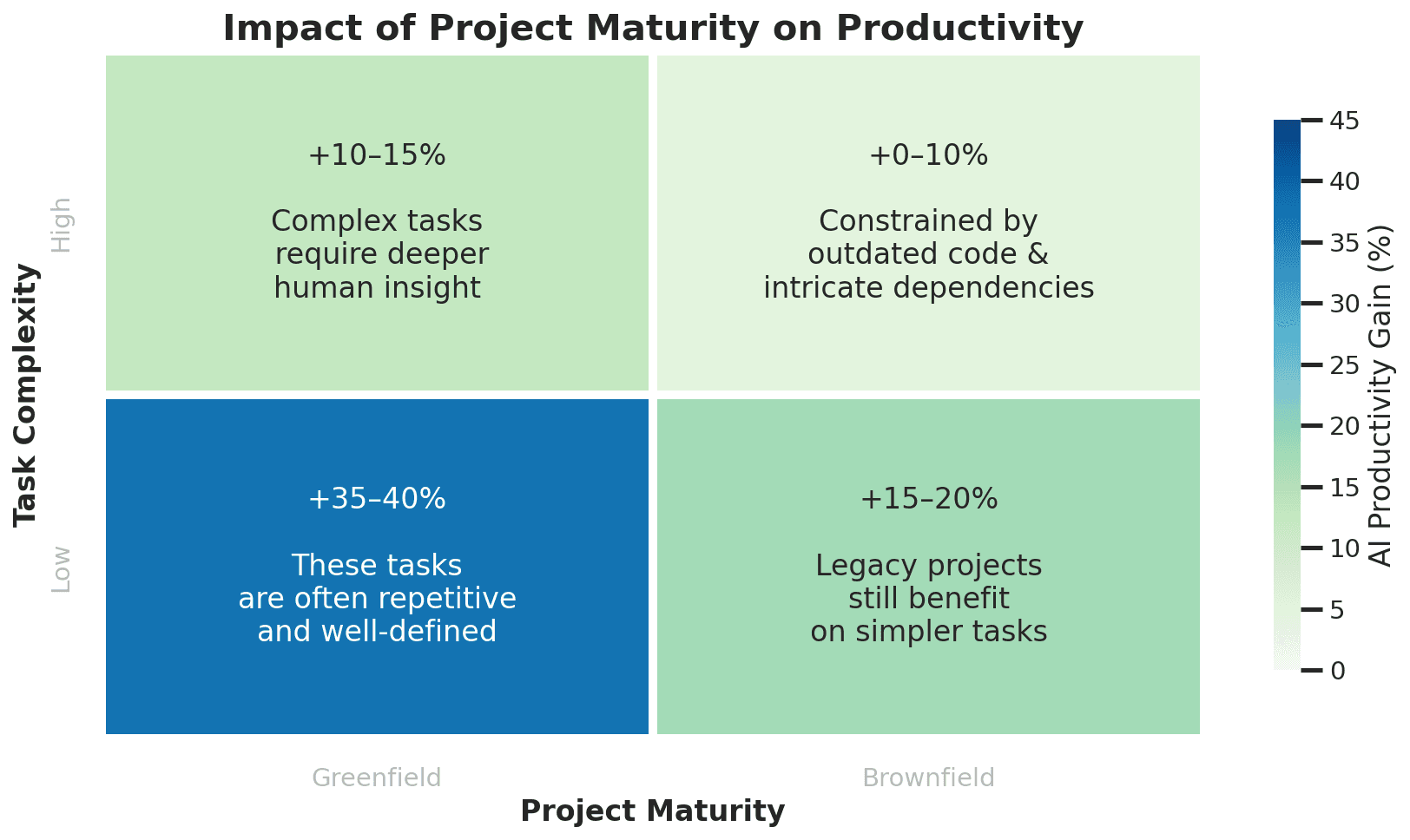
Maximizing developer productivity with Artificial Intelligence requires transforming LLMs from casual chat companions into deterministic engineering co-workers. By implementing structured context prompting, leveraging codebase-aware IDE agents (like Cursor and Copilot Workspace), and systematically offloading repetitive boilerplate, unit testing, and schema parsing, engineers can reclaim up to 50% of their operational hours for complex system architecture and business logic design.
Introduction: The Paradigm Shift in Modern Software Engineering
Software development has always been constrained by cognitive friction—the mental overhead of remembering syntax structures, writing repetitive boilerplate code, configuring database migrations, and manually tracing obscure runtime errors. While high-level architecture requires deep human reasoning, a significant percentage of a developer's day has historically been consumed by mechanical, syntax-heavy tasks.
With the maturation of Large Language Models (LLMs) and context-aware coding assistants, this equation has fundamentally shifted. However, a major divide exists in the industry: developers who treat AI as a basic search engine often experience hallucinations, low-quality code snippets, and integration friction. Conversely, senior engineers who treat AI as a structured code partner multiply their daily output exponentially. In this masterclass guide, we explore the exact systems, patterns, and workflows needed to integrate AI safely and productively into your daily software lifecycle.
Phase 1: Architecture, Scaffolding, and Data Modeling
The most expensive phase of any feature implementation is the initial blank canvas. Structuring clean database schemas, writing complex TypeScript interfaces, and setting up Zod validation pipelines take valuable time. AI acts as an elite scaffolding engine when given precise domain context.
Designing Strict Type-Safe Schemas with AI
Never ask an AI to 'write a user model.' Instead, provide exact operational boundaries, database constraints, and validation requirements using structured prompting formulas.
// Example: Enterprise-Grade TypeScript / Zod Schema Generated via Structured Prompting
import { z } from "zod";

export const OrganizationTierSchema = z.enum(["FREE", "PRO", "ENTERPRISE"]);
export type OrganizationTier = z.infer<typeof OrganizationTierSchema>;

export const TenantWorkspaceSchema = z.object({
  id: z.string().uuid(),
  name: z.string().min(2).max(100),
  slug: z.string().regex(/^[a-z0-9-]+$/),
  tier: OrganizationTierSchema.default("FREE"),
  maxSeats: z.number().int().positive(),
  createdAt: z.date().default(() => new Date()),
  metadata: z.record(z.unknown()).optional(),
});

export type TenantWorkspace = z.infer<typeof TenantWorkspaceSchema>;
Phase 2: Writing Comprehensive Unit and Integration Tests
Writing unit tests is universally acknowledged as a pillar of robust software engineering, yet it is frequently sidelined under aggressive sprint deadlines. AI excels at analyzing pure business logic and generating edge-case test suites that cover unexpected exceptions, boundary values, and race conditions.
// Example: AI-Generated Comprehensive Jest Test Suite for a Billing Calculation Service
import { calculateTierPricing } from "./billingService";

describe("calculateTierPricing() Business Logic", () => {
  it("should calculate correct monthly pricing for standard free tier users", () => {
    const result = calculateTierPricing({ tier: "FREE", activeSeats: 3 });
    expect(result.totalMonthlyCents).toBe(0);
    expect(result.appliedDiscount).toBe(0);
  });

  it("should apply enterprise bulk discounts correctly when seat count exceeds threshold", () => {
    const result = calculateTierPricing({ tier: "ENTERPRISE", activeSeats: 150 });
    expect(result.totalMonthlyCents).toBeLessThan(150 * 50); // Validates bulk tier discount math
    expect(result.appliedDiscount).toBeGreaterThan(0.15);
  });

  it("should throw an invalid configuration error for negative or zero active seats", () => {
    expect(() => calculateTierPricing({ tier: "PRO", activeSeats: 0 })).toThrow(
      "Seat allocation must be a positive integer"
    );
  });
});
Phase 3: Intelligent Debugging and Log Analysis
When distributed systems throw cryptic stack traces across microservices, traditional searching through StackOverflow can consume hours. By feeding the exact runtime stack trace, environment configuration, and relevant code snippet into an AI assistant, you can accelerate root-cause isolation by up to 80%.
Best Protocol for AI-Assisted Debugging
- Provide Complete Runtime Context: Include Node/PHP/Python runtime versions, framework versions (e.g., Next.js 15, Laravel 11), and ORM configurations.
- Isolate the Stack Trace: Strip out repetitive internal framework noise and paste the exact error message alongside the initiating function.
- Request Root Cause Explanation: Ask the model to explain *why* the error occurred before generating the patch fix to ensure deep understanding.
Phase 4: Modernizing Legacy Monoliths and Refactoring
Every mature codebase accumulates technical debt: legacy callback hell, outdated synchronous file I/O operations, or unoptimized database queries. AI models serve as tireless refactoring partners when given explicit rules for modern syntax transformation.
// Before: Legacy Synchronous File Processing with Callback Hell
fs.readFile('/data/config.json', 'utf8', (err, data) => {
  if (err) handleErr(err);
  else {
    parseJSON(data, (parseErr, parsed) => {
      if (parseErr) handleErr(parseErr);
      else saveToDatabase(parsed, (dbErr) => {
        if (dbErr) handleErr(dbErr);
        console.log("Migration complete!");
      });
    });
  }
});

// After: AI-Refactored Clean Asynchronous / Await Pipeline with Error Boundaries
async function processConfigurationFile(): Promise<void> {
  try {
    const rawData = await fs.promises.readFile('/data/config.json', 'utf8');
    const parsedData = JSON.parse(rawData);
    await saveToDatabase(parsedData);
    console.log("Migration complete successfully!");
  } catch (error) {
    handleError(error instanceof Error ? error : new Error(String(error)));
  }
}
Advanced Engineering Strategies: Codebase Indexing and Agents
Basic chat windows require you to copy and paste code back and forth. Modern developer productivity relies on **Codebase Indexing** (via tools like Cursor, Windsurf, or GitHub Copilot Workspace). These tools ingest your entire repository structure, mapping file dependencies, helper utilities, and configuration schemas into a local vector database.
How to Leverage AI Coding Agents Effectively
- Use Workspace Indexing: Allow your IDE tool to index the entire project directory so it understands custom import aliases and project architecture.
- Write Explicit Plan Prompts: Before letting an agent modify files, ask it to draft a multi-step execution plan in a markdown scratchpad.
- Scope File Modifications: Limit agent write permissions to specific directories (e.g., /components/ui or /services) to prevent unwanted regressions across core system files.
Best Practices vs. Common Pitfalls
What to Do
- Treat AI Code Like Junior PRs: Always review, test, and validate AI-generated code before merging into staging or production branches.
- Provide Deep Context: Include your exact framework dependencies, environment variables, and architectural patterns in your prompt briefs.
- Maintain Mental Engagement: Use AI to accelerate typing and boilerplate generation, but retain absolute ownership over system design and security trade-offs.
- Enforce Static Analysis: Run strict linters, TypeScript type checks, and SAST security scanners on all AI-assisted code contributions.
What to Avoid
- Blindly Copy-Pasting: Never deploy generated code that you cannot fully explain, trace, or debug yourself.
- Leaking Sensitive Credentials: Never paste production API keys, proprietary customer data, internal database connection strings, or secret tokens into public LLM boxes.
- Allowing Skill Atrophy: Relying entirely on AI without writing code manually can erode core syntax fluency and problem-solving resilience.
- Ignoring Performance Bottlenecks: LLM-generated solutions can occasionally introduce inefficient loops, N+1 query problems, or unoptimized memory allocations.
Frequently Asked Questions (FAQ)
Q1: Will AI coding assistants replace software engineers?
No. AI replaces syntax memorization, repetitive typing, and boilerplate generation. It does not replace system architecture design, requirements translation with non-technical stakeholders, edge-case debugging, or security threat modeling. Developers who master AI tools will replace those who do not.
Q2: How can enterprise engineering teams ensure data privacy when using AI?
Enterprise teams should mandate enterprise-tier developer environments (such as GitHub Copilot Business or enterprise API agreements) that explicitly guarantee zero data retention, no model training on internal source code, and SOC2 compliance.
Q3: What is the ideal workflow balance between manual coding and AI generation?
The optimal balance is 70/30 or 80/20: let AI handle 70-80% of the mechanical setup, unit test scaffolding, type definitions, and repetitive refactoring, while you focus 100% of your energy on architectural integrity, security compliance, and core business logic.
Conclusion
Artificial Intelligence represents the most powerful force multiplier in the history of software engineering. By moving away from casual prompting and adopting structured contextual workflows, codebase indexing, and rigorous code review standards, you can transform AI into an indispensable partner that supercharges your daily engineering productivity.
References & Authoritative Sources
- GitHub Research - Quantifying GitHub Copilot's Impact on Developer Productivity - https://github.blog/2023-06-13-research-quantifying-github-copilots-impact-on-developer-productivity/
- Stack Overflow Annual Developer Survey - AI Tool Adoption Insights - https://survey.stackoverflow.co/
- Anthropic Engineering Blog - Effective Code Generation Strategies with Claude - https://www.anthropic.com/news
- Martin Fowler - AI and the Future of Software Architecture - https://martinfowler.com/